


Turning a Broken Laptop Into a Home Server
Home-Lab Chapter 0: A headless, remotely accessible server running Ubunut Server off an old laptop
The Premise
In efforts to grow my knowledge base of all things IT, I have been looking to getting into the home server space (homelab). Having a home server means an environment to learn a myriad of useful administration skills, and it’s something that can be expanded upon endlessly. Also, it means I can run a game server to play games with my friends on, and this game server can be managed no matter where I am in the world via my phone and a VPN.
In the end, I got a basic starter homelab:
-
Runs Ubuntu Server.
-
Accessible anywhere in my house through local network.
-
Accessible anywhere in the world through Tailscale VPN solution.
-
Backup power through the built-in battery.
-
Enough compute power to provide useful services, like a game server.
The Machine
I had a few desires for the machine to power all this:
-
Powerful enough for practical modern uses, like a game server.
- At least 8GB of RAM, and a decent processor with a few cores on it for multitasking.
-
Compact form factor that doesn’t take up space.
-
Power efficient and quiet.
-
Cheap!
My first thought, and based off of experience from people I know doing the same thing, was to get a miniature PC, like a NUC. These seem to be expandable, and can even be fun to buy multiple to expand the server into a little cluster setup. Even if buying used though, it would be at least $100 for a decent one, a small barrier to entry would really be the best motivator here.
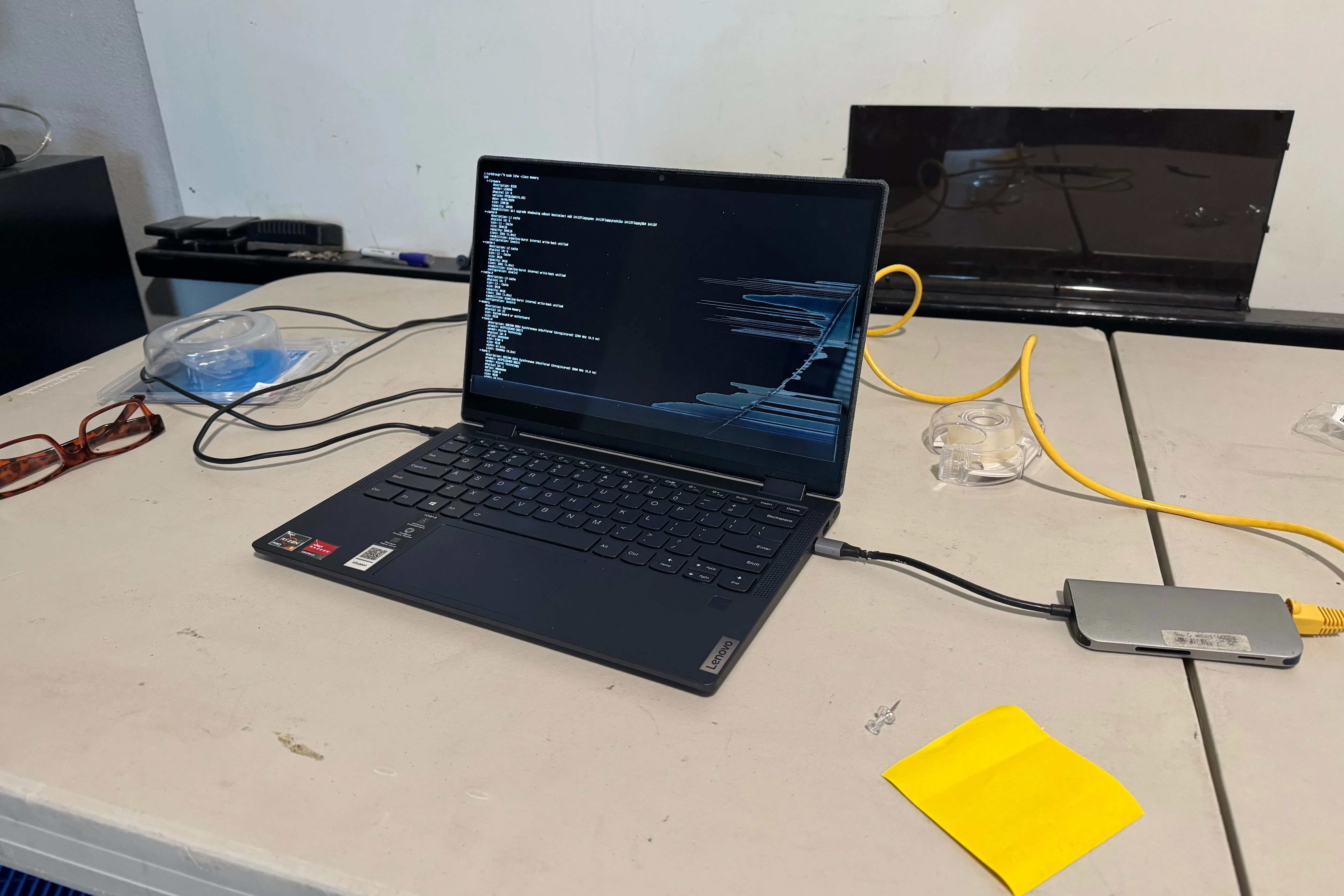
Then I realized the perfect culprit was beneath my nose this whole time: my old personal laptop from just a few years ago. A Lenovo Yoga 6 with a Ryzen 5 Pro 4650u CPU (though regrettably only 8 GB of on-board RAM with no expansion), it’s more than capable for a starting homelab machine, and can handle actual use cases, like a game server, pi-hole, or simply a Linux/sysadmin learning machine.
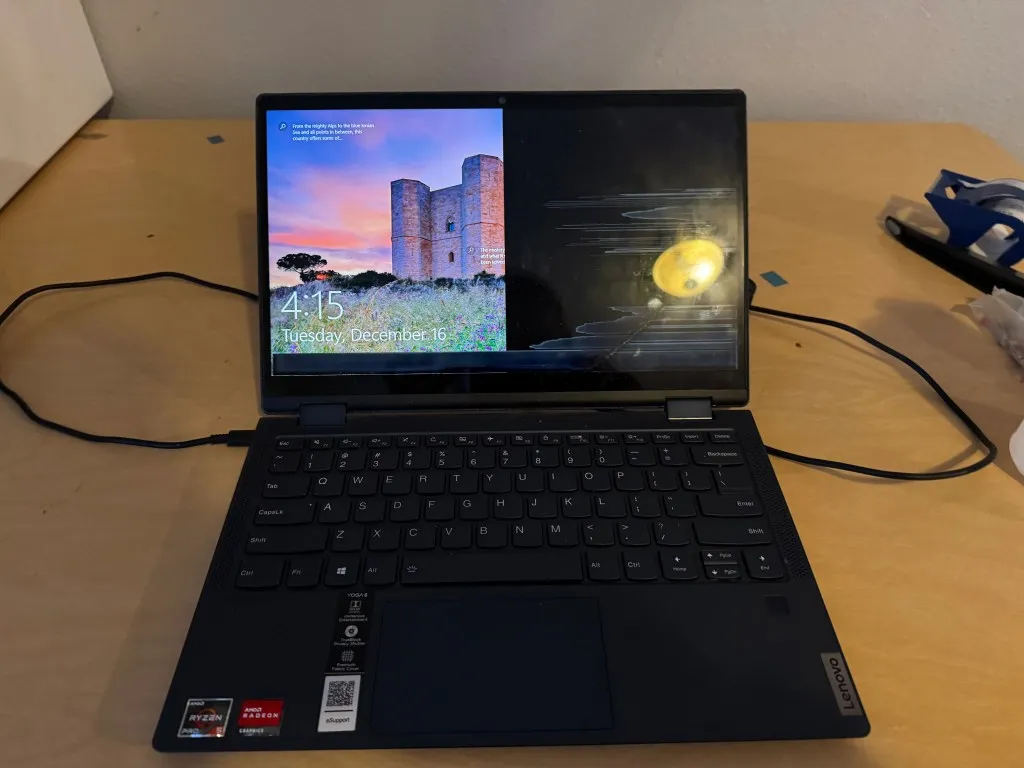
To make this an even more perfect candidate, is that the right side of the screen is broken. Any non-CLI based use is pretty much infeasible anyways. So what else could I possibly use this for? Also, since it’s a laptop, it has it’s very own built in UPS: it’s battery!
The Plan
This is only the start of a greater project, a project that I plan to continuously expand so long as I need more functionality. As such, it’s best to think of this in phases. To start, PHASE ZERO.
PHASE ZERO
Stack the bones for the first machine in my homelab project, aptly named “draugr”, a formidable laptop in it’s previous life, risen to fight again to prove it’s formerly lethal injuries to be merely a scratch.
PHASE ZERO plan:
-
Install Ubuntu Server onto the laptop
-
Install SSH so that the server can be operated remotely
-
Set up the network environment so that draugr keeps a set static IP, and can have it’s ports forwarded for any public facing service.
-
Adjust the operating system so that draugr stays alive even if it is slain (doesn’t shut off when the laptop lid closes!)
-
Prove its power by implementing a basic game server (Hytale Dedicated Server)
When I can remotely access draugr at any time (24/7 uptime) from any place in the world, and draugr proves itself able to host a service useful to me (my game server), I know the complete condition for PHASE ZERO has been met.
The Operating System
I had a couple goals in mind for this project: learn Linux, get more familiar with a command line interface, create an open ended system that I can add more services to easily, and overall just learn more about networking and servers. In essence, learning is the primary objective. So I should learn something that is used often in both hobbyist and enterprise environments. I won’t tackle a hypervisor OS yet, as I’ll try something more beginner friendly first. Also, a visual interface is totally irrelevant because half the screen doesn’t work. Last of all, I don’t want to spend any money. So the standard route of going with Ubuntu Server was pretty obvious based on my research.
The Implementation
Ubuntu Server OS Install
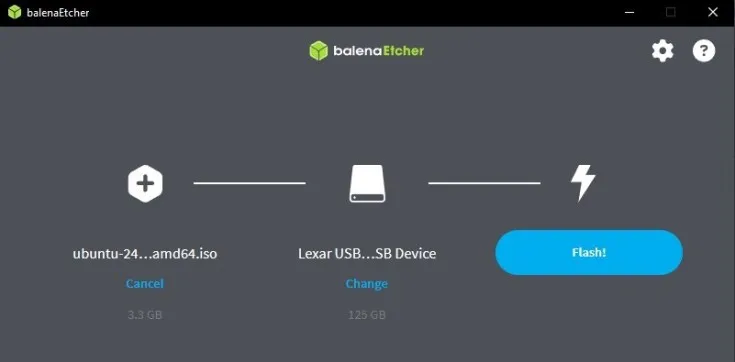
After backing up any old data I wanted from the laptop, I used balenaEtcher to create a bootable Ubuntu Server 24 LTS installer. The installation was configured with default options, including a Logical Volume Management (LVM) for storage and future flexibility. I bestowed upon it a name, and with this, draugr was ready for battle and booted to the Ubuntu command line interface.
DHCP Reservation and Static IP
To ensure I can consistently reach draugr using the network, I set up the server to request a specific static IP, as well as configure my local router to reserve that same IP for draugr. This also helps with port forwarding so that the router knows exactly what device to forward public facing traffic to, and it doesn’t change even when draugr reboots.
SSH and Remote Access
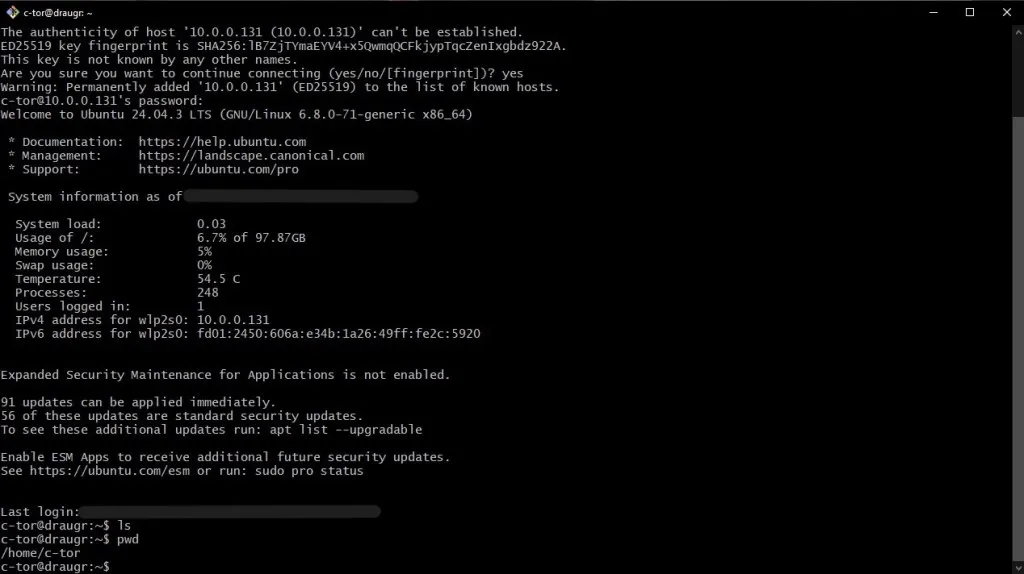
Working with the laptop was still pretty tricky given it’s half-working screen, so getting SSH working was top priority; I needed to be able to access draugr from a separate device to continue setup. I installed OpenSSH on the server, and accessed it via login credentials. In the future, I should set up SSH keys to be more secure. Now, the server was truly headless and accessible 24/7 via my local network.
VPN and Access From Anywhere
Since I wanted to reach draugr from anywhere, I set up Tailscale, a lightweight VPN service that creates a private network across devices. With the Tailscale app installed on my phone, I can connect directly to draugr with it’s Tailscale IP, allowing access from anywhere with an internet connection. This also came with nice security conveniences, as I didn’t need to set up any public facing port for this to work.
Game Server
draugr is also powerful enough to run a game server. The main motivator behind this project was to create a dedicated server to play the new game Hytale with my friends. I downloaded the official dedicated server command-line installer and used to set up all the required files on the system. I also allocated more RAM to the game server to give it better performance.
To keep the game server running independently of my SSH sessions, and to allow me to manage other parts of draugr at the same time, I ran the server inside a screen session. This lets the server run in the background even after I disconnect.
The Problems (and The Solutions)
Operating System Installation Troubles
Something got interrupted during my installation of Ubuntu Server. My diagnosis and interpretation is likely off considering lots of the information was not showing given the half broken screen, but it seemed that the server froze in the middle of installation. I had to reboot. Yet here’s another problem with my laptop, the power button doesn’t work either! And the pinhole for BIOS restart on the bottom, which I normally use, didn’t work. So I had to do surgery to manually unplug the battery from inside the laptop, since the battery is not detachable.
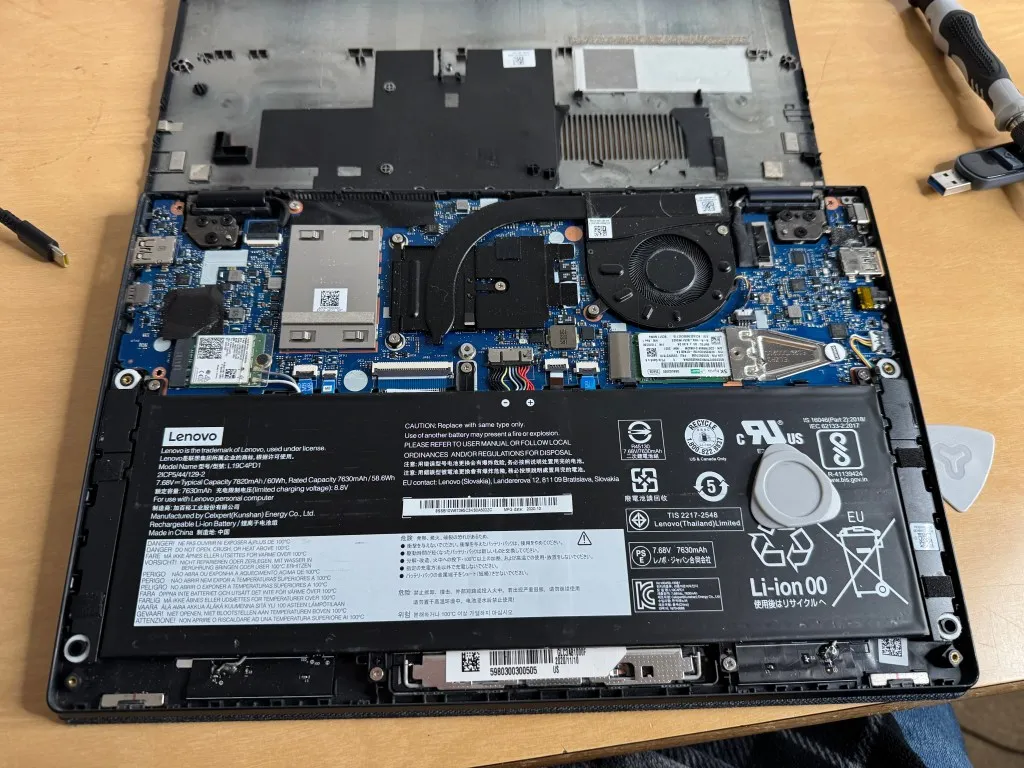
After restart, it then went to the standard Ubuntu Server command-line. The problem here, was that I hadn’t completed the install, so I had no account to log into, and thus couldn’t access the command line to shut it down again. So after opening up the laptop several times to replug the battery, I was able to catch the BIOS and restart installation.
But What Happens When the Lid Closes?
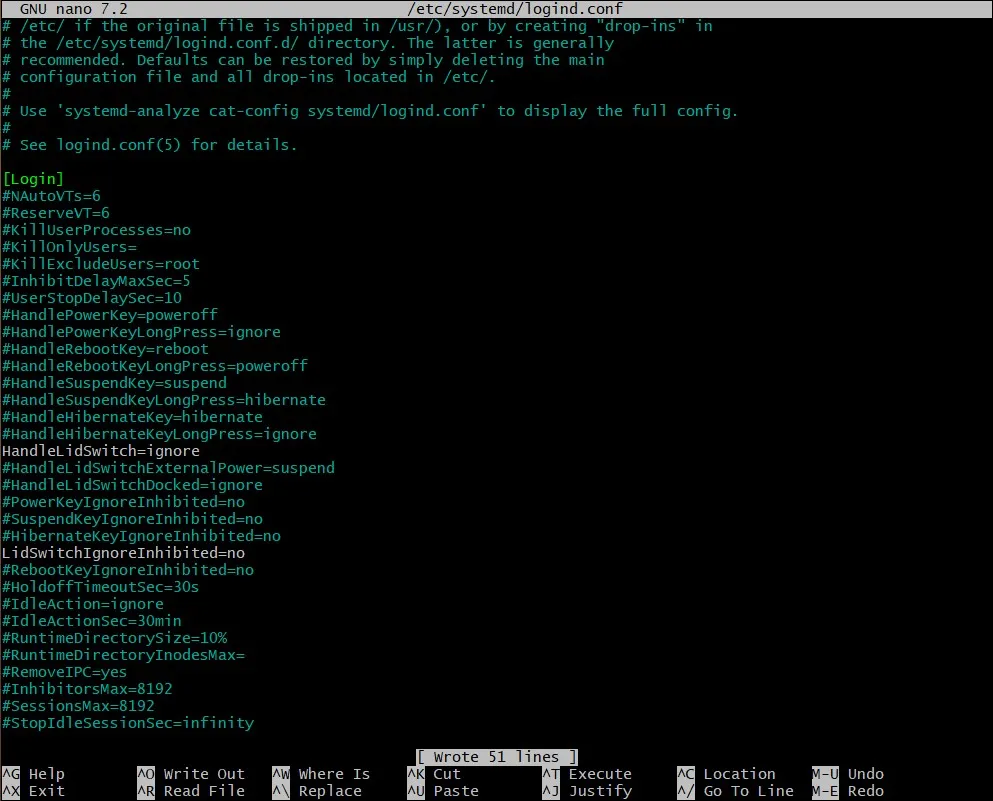
Handling of lid closure was my biggest question going into this. Does Ubuntu Server even have considerations for running on a laptop? You bet it does. By default, laptops are configured to suspend when the lid is closed. I set up a config on the server that told the OS to ignore any Lid closure handling. With no suspend behavior or display, the server can stay running and doesn’t even have to waste power and resources displaying to a screen.
The Learning Experience
I learned a lot in this project, and it’s really not my typical field-of-work either. I knew some things beforehand, like basic linux commands in operating systems classes, but for that I was only interacting with a server. I had never built one up before. I know it’s very simple at the moment, but it feels good to look behind the curtains of something you’ve routinely interacted with.
Some things I learned or did for the first time:
-
Installing a Linux-based OS.
-
Creating an SSH host environment.
-
Customizing and configuring Linux server environment to fit my needs.
-
Computer networking, troubleshooting network problems.
-
Considerations for network security and risks that might be involved.
A learning experience I most enjoyed though, were all the considerations. It’s easy to set something up, but it’s really tricky when you want that thing to stay set-up. In order to do that, I needed to consider and prepare for possible scenarios. Is my hardware capable of running the services I want it to run? What happens when the lid closes? How can I access my server away from home if a critical service fails? Worst of all, am I opening up a home network to any security threats? There are many other questions I can ask that I don’t yet have an answer to. The mindset of maintenance rather than just set-up was the primary learning experience for me. Given this is a project I can really expand a lot on with even more services, I’ll have to continuously work out this mindset.
The Future
I will admit, this is a very rudimentary set up, even by hobbyist home server standards. And by no means are the ways I implemented things the best and most secure methods.
SSH Keys and Security
SSH into my server from outside my network shouldn’t be feasible as there’s no public facing port for it. However, it’s best practice to use SSH keys instead of passwords (or just use both). Bot networks could brute-force their way in (and steal my game server world!!!). But again, I am not using public facing ports so there shouldn’t be danger. Additionally, I wouldn’t have to type in my password every time!
I’ve done this before for a school class, and it’s really a simple thing to do. Just something I wanted to highlight though.
Virtualization
Virtualization, via either virtual machines or containers, could make individual services feel much cleaner, manageable, and safer. Sacrificing a bit more system resources, of course. Right now each service is just a process accessible by every other service and that gets messy.
This is something I’d still like to do more research on, and doing it hands-on would surely be the best route. Though, I see this being the focus of the next couple phases. From my research, it seems containers would be best starting point as I only have a laptop with 8 GB at the moment. It also seems that containers have gotten more popularity nowadays compared to VMs.
Other Services
A game server would be about the most intense service that I’d like to put on this system, but I’m hoping to squeeze a few more on. Some other projects I have in mind:
-
Pi-hole (network-wide advertisement blocker)
-
Database Server
-
I had an idea for an SQL server / application that can host an inventory of all my random tech components and tools lying around. I’m a super messy person and something like this can supplement that.
-
I may want to have a database backend for another project. I have a few game development ideas that would require a database backend, and this could be the perfect testing ground.
-
-
Web Server
- Public-facing or local network only.
-
Git Server
- Maybe if I get bored of github for whatever reason, or want more data, I can learn how to host my own repositories.
Whatever the next project I work on, or service I’d like to add to my repertoire, it’s nice to know I already have draugr up and running willing to take on the challenge. This is not only a fun project, but an actual useful tool that can help me in any other projects I might have in the future. Thank you for reading!